Personal Alarms
A personal alarm supports access to help but does not prevent falls or guarantee an emergency response. Selection should consider the person’s ability to wear, activate, charge and test the device, as well as mobile coverage, monitoring arrangements, responder availability, home access and ongoing costs.
Overview
A personal alarm allows a person to send an alert when they:
- Fall
- Become unwell
- Feel unsafe
- Cannot reach a telephone
- Need urgent assistance
- Become lost or disoriented
- Experience an emergency while away from home
Common options include:
- Pendant alarm
- Watch alarm
- Home-based alarm
- Mobile alarm
- Professionally monitored alarm
- Family- or friend-monitored alarm
- Automatic fall-detection alarm
- GPS-enabled alarm
Video Introduction
These short videos demonstrate how family-monitored SureSafe personal alarms are used.
Pendant Alarm
Watch: How to use the SureSafeGO Family Monitored Personal Alarm
`vid
https://www.youtube.com/watch?v=rTCyk-3Ng5o
Title: How to use the SureSafeGO Family Monitored Personal Alarm
Author: SureSafe Alarms
Thumbnail: https://i.ytimg.com/vi/rTCyk-3Ng5o/mqdefault.jpg
AuthorUrl: https://www.youtube.com/@suresafealarms391
`
This video introduces the SureSafeGO family-monitored pendant alarm, including basic activation and use.
Watch Alarm
Watch: How to use the SureSafeGO Plus Family Monitored Smartwatch Alarm
`vid
https://www.youtube.com/watch?v=esbsa9LHZZ8
Title: How to use the SureSafeGO Plus Family Monitored Smartwatch Alarm
Author: SureSafe Alarms
Thumbnail: https://i.ytimg.com/vi/esbsa9LHZZ8/mqdefault.jpg
AuthorUrl: https://www.youtube.com/@suresafealarms391
`
This video introduces the SureSafeGO Plus family-monitored smartwatch alarm, including basic use of the watch-style device.
[!note]
These videos are product examples. Setup, charging, contacts, fall detection, monitoring and cancellation procedures may differ between alarm models. Follow the instructions supplied with the selected device.
Main Decisions
The main choices are:
- Pendant or watch
- Home-based or mobile
- Professionally monitored or non-monitored
- Manual activation or automatic fall detection
- Purchase or rental
- One-off cost or ongoing fee
- Family response or professional response
Pendant Alarm
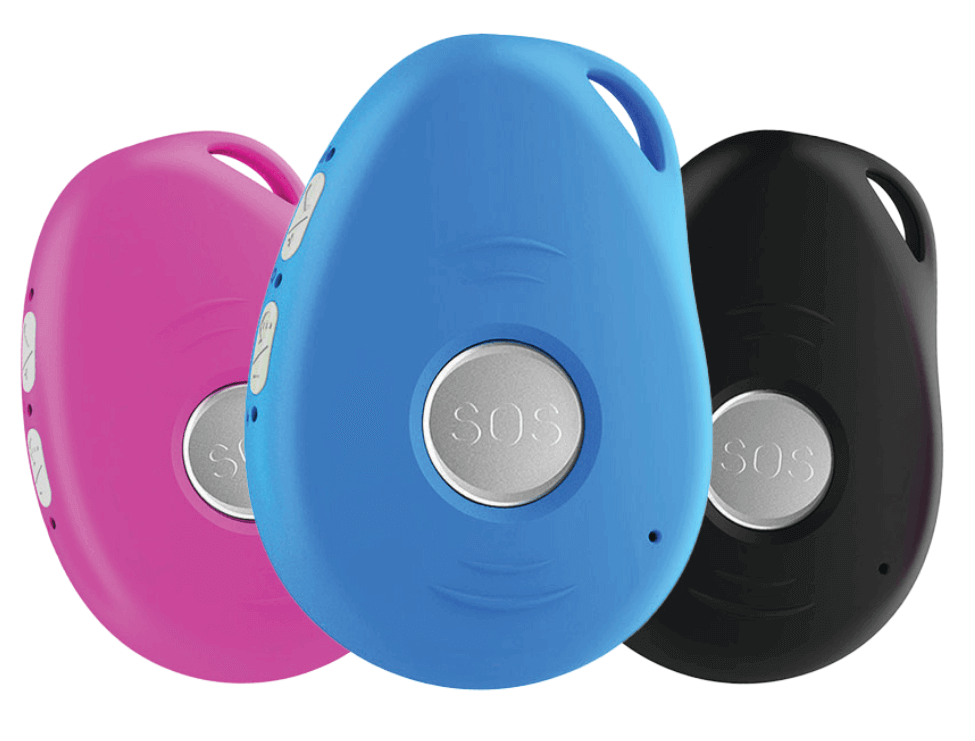
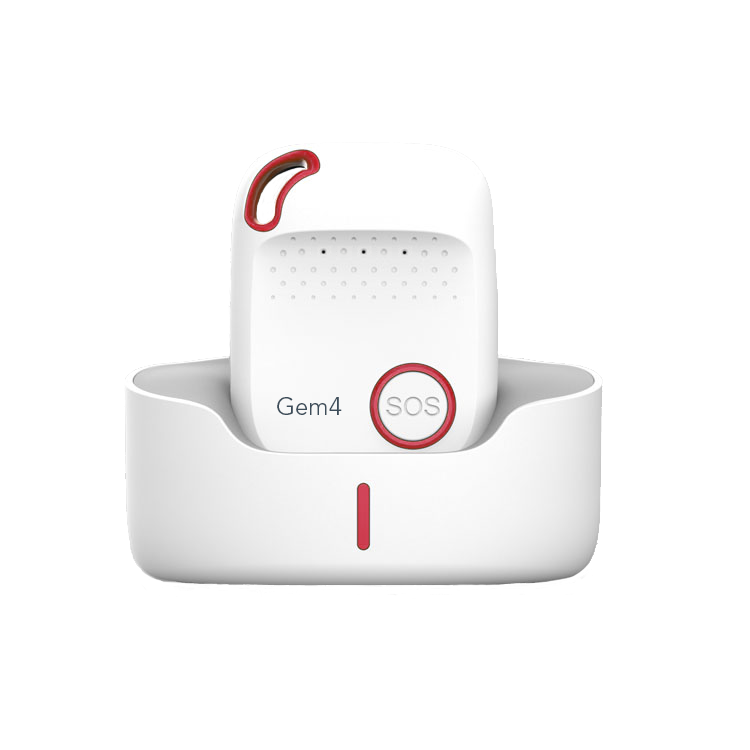
A pendant alarm is worn around the neck or attached to clothing.
It may include:
- SOS button
- Speaker and microphone
- Fall detection
- GPS
- Mobile SIM
- Charging cradle
- Lanyard
- Waterproof or water-resistant housing
Benefits
- Large and easy-to-find SOS button
- Can be worn over clothing
- Often easier to activate than a small watch screen
- May provide louder speaker volume
- Can be worn in the shower if approved for water exposure
- May suit people with reduced hand dexterity
- Usually simple to operate
Limitations
- The person may forget or refuse to wear it
- A neck cord may be uncomfortable
- The device may swing or knock against objects
- It may be removed during sleep or showering
- It can be left on a table or charger
- Some users dislike the appearance
- A long cord may create an entanglement risk
May Suit
- A person who can press a large button
- A person who does not regularly wear a watch
- A person with reduced vision
- A person who wants simple operation
- A person who needs a louder speaker
- A person who can keep the pendant on the body
Watch Alarm
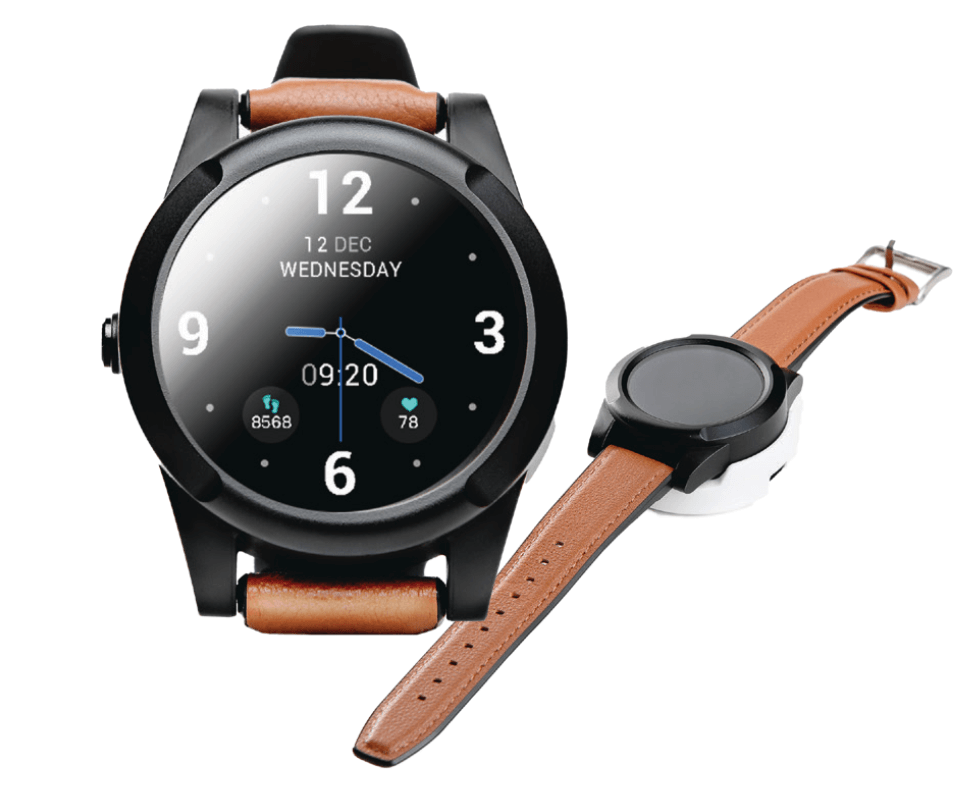
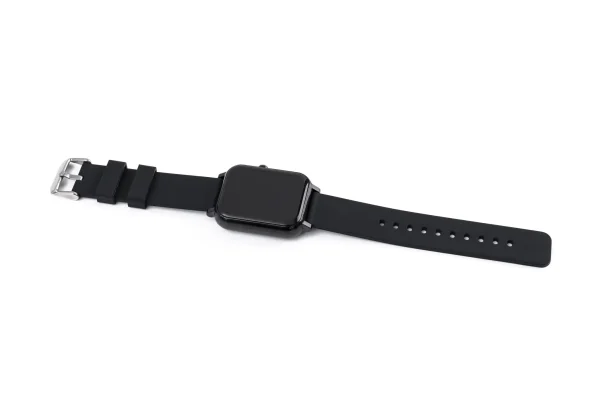
A watch alarm is worn on the wrist.
It may include:
- SOS button
- Touchscreen
- Time and date
- Two-way communication
- Fall detection
- GPS
- Geofencing
- Heart-rate or activity features
- Medication reminders
Benefits
- More discreet
- May be worn consistently by a person used to watches
- Less likely to be left on a table
- Easy to access from the wrist
- May include useful smartwatch functions
- Can support GPS and mobile use away from home
Limitations
- Small buttons or screen
- May be difficult with tremor or reduced dexterity
- May require more frequent charging
- Touchscreens can be confusing
- Speaker volume may be limited
- The person may remove it overnight
- Wrist position may affect fall detection
- Some watch straps are difficult to fasten
May Suit
- A person who already wears a watch
- A person who prefers a discreet device
- A person who can manage a screen or smaller SOS button
- A person who can charge the watch routinely
- A person who requires mobile GPS support
Pendant vs Watch
| Consideration | Pendant | Watch |
|---|---|---|
| SOS button size | Often larger | Often smaller |
| Visibility | Easy to see on chest | Easy to see on wrist |
| Dexterity demand | Usually lower | May be higher |
| Discreet appearance | Lower | Higher |
| Charging frequency | Varies | Often more frequent |
| Speaker size | Often larger | Often smaller |
| Shower use | Check water rating | Check water rating |
| Risk of being left behind | May be left on table | Less likely if worn routinely |
| Cognitive demand | Usually simple | May include more menus |
| Fall detection position | Torso movement may be detected | Wrist movement may affect detection |
| Best fit | Simple emergency button | User comfortable with watches and charging |
Home-Based Alarm
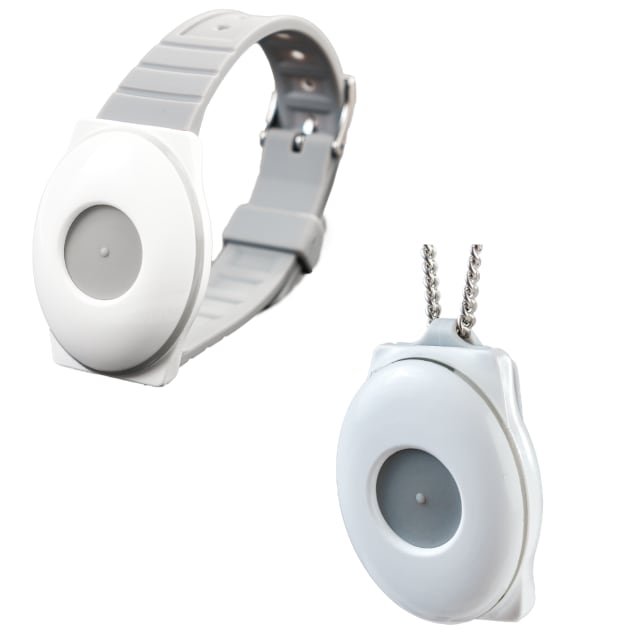
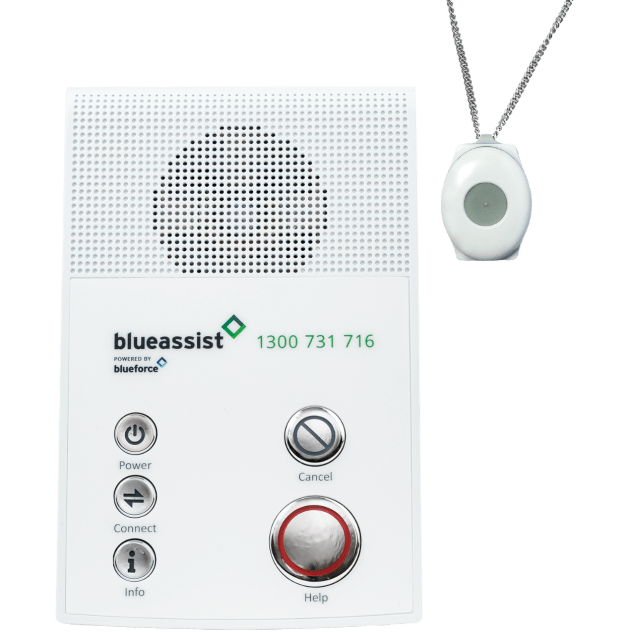
A home-based system usually includes:
- Base unit
- Pendant or wrist button
- Mains power
- Battery backup
- Mobile-network connection
- Speaker and microphone
The wearable button sends the alert to the base unit.
Benefits
- Simple wearable button
- Base unit may provide louder communication
- Multiple pendants may be linked
- Battery life of the wearable may be long
- May suit a person who remains mainly at home
Limitations
- Limited operating range
- Walls, fences and sheds may reduce range
- Usually does not work away from the property
- Base unit requires power
- Coverage must be checked in the garden, bathroom and bedroom
- A power outage may depend on the backup battery
Mobile Alarm
A mobile alarm contains its own SIM and operates through the mobile network.
It may be a pendant or watch.
Benefits
- Can work away from home
- May provide GPS location
- Allows two-way communication
- Does not require a home base unit
- May suit community access
Limitations
- Requires mobile coverage
- Requires charging
- SIM fees may apply
- GPS may be less accurate indoors
- Battery life varies
- The person must take it when leaving home
Monitored Alarm
A professionally monitored alarm connects to a staffed monitoring service, usually 24 hours a day.
When an alert is received, the operator may:
- Speak with the user
- Contact family or nominated responders
- Contact emergency services
- Follow a pre-agreed response plan
- Use GPS information
- Escalate when the user cannot respond
Benefits
- Staffed response pathway
- Does not depend only on family availability
- May suit people with no reliable contacts
- Response protocols can be documented
- Monitoring staff can coordinate assistance
- May provide reassurance for the user and family
Limitations
- Ongoing monitoring fee
- SIM or connectivity fee may be separate
- Service conditions and contracts vary
- False alarms are passed to the monitoring service
- Personal and location information is shared with the provider
- Response still depends on communication, location data and access to the home
May Suit
- The person has no reliable responder
- Family members are often unavailable
- Contacts live far away
- The person has significant medical or falls risk
- A 24-hour response pathway is needed
- The person does not want family to carry primary responsibility
- A provider or funding program requires professional monitoring
Non-Monitored Alarm
A non-monitored or family-monitored alarm calls or messages nominated contacts directly.
The device may call contacts in sequence until someone answers.
Benefits
- Usually lower ongoing cost
- No professional monitoring fee
- The responder knows the person
- Contacts may have medical and access information
- Response can be personalised
- May be suitable where family or neighbours are consistently available
Limitations
- Contacts may not answer
- Phones may be off, silent or out of coverage
- Contacts may be at work or away
- The first responder may not be physically able to assist
- Family members must understand the response plan
- Contact details must be kept current
- SIM fees may still apply
- The user may believe the alarm is monitored when it is not
May Suit
- Reliable contacts are available
- Contacts consent to the role
- At least one person can usually answer
- Contacts know when to call emergency services
- Home access is arranged
- Lower ongoing fees are a priority
- The person’s risk level does not require professional monitoring
Monitored vs Non-Monitored
| Feature | Professionally monitored | Non-monitored |
|---|---|---|
| Alert received by | Monitoring centre | Family, friends or carers |
| Availability | Usually 24/7 | Depends on contacts |
| Ongoing monitoring fee | Yes | Usually no |
| SIM fee | May be included or separate | Often still required |
| Response protocol | Formal and documented | Must be arranged by family |
| Suitable without family contacts | Yes | No |
| Personalised knowledge | May rely on recorded information | Contacts often know the person |
| Main risk | Service cost and provider dependence | Alert may not be answered promptly |
How to Choose
Consider each of the following areas when selecting a commode.
Step 1: Identify the Main Risk
Consider:
- Falls
- Medical emergency
- Living alone
- Wandering
- Getting lost
- Anxiety when alone
- Unable to reach a phone
- Community mobility
- Night-time risk
- Shower-related falls
- Seizures
- Fluctuating health
- Family concern
Step 2: Decide Where It Must Work
Home Only
Consider:
- Home base unit
- Pendant or wrist button
- Required range
- Garden and shed coverage
- Bathroom coverage
- Battery backup
Home and Community
Consider:
- Mobile pendant
- Alarm watch
- SIM connection
- GPS
- Mobile coverage
- Battery duration
- Charging routine
Step 3: Check the Person Can Use It
Assess:
- Ability to remember to wear it
- Ability to press and hold the button
- Ability to hear prompts
- Ability to speak through the device
- Ability to understand an alert
- Ability to cancel a false alarm
- Ability to charge it
- Ability to put it on
- Ability to respond to monitoring staff
- Acceptance of GPS tracking
- Cognitive and behavioural factors
Step 4: Choose the Response Model
Choose professional monitoring when:
- Contacts are unreliable or unavailable
- The user requires a consistent 24-hour pathway
- The person may be unable to explain what happened
- Family cannot manage the response role
- A formal escalation process is needed
Choose family or friend monitoring when:
- Contacts are reliable
- Contacts agree to respond
- Contacts can answer calls
- Contacts understand escalation
- Contacts have access to the home
- The ongoing cost needs to be lower
Step 5: Check Ongoing Costs
Do not compare only the purchase price.
Ask about:
- Device purchase price
- Rental fee
- Establishment or activation fee
- Professional monitoring fee
- SIM fee
- Mobile data fee
- Annual renewal
- App subscription
- GPS subscription
- Fall-detection fee
- Replacement battery
- Replacement strap or lanyard
- Repair fee
- Cancellation fee
- Exit fee
- Lost-device fee
- Replacement-device cost
- Call or SMS excess usage
- Key-safe cost
- Installation fee
- Testing or service fee
Ongoing Fees
Possible fee structures include:
No Professional Monitoring Fee
The user buys the device and pays only:
- SIM renewal
- Call or SMS usage
- Mobile service
- Optional app or GPS fees
Monthly Monitoring Fee
The user pays:
- Monthly professional monitoring
- SIM fee, either included or separate
- Possible setup or installation fee
Annual Monitoring Fee
The user pays for:
- Twelve months of monitoring
- SIM access
- Possible annual renewal
Rental Model
The user pays:
- Weekly or monthly rental
- Monitoring
- Service and replacement, depending on contract
Questions to Ask
- Is the SIM fee included?
- Is professional monitoring included?
- Does the price increase after the first year?
- Is there a minimum contract?
- What happens if funding stops?
- Who pays for repairs?
- Is there an exit fee?
- Are false alarms charged?
- Are emergency calls charged?
- Is GPS included?
- Are replacement devices supplied during repair?
- Does the service automatically renew?
[!tip]
Record the total cost over at least two years. A low purchase price can become more expensive when SIM, monitoring and subscription fees are added.
Fall Detection
Automatic fall detection uses movement sensors to identify a possible fall.
Benefits
- May send an alert when the person cannot press the button
- May support people with loss of consciousness
- May provide additional reassurance
Limitations
- Not all falls are detected
- Normal movement may trigger false alarms
- Slow slides may not be detected
- The device may not detect a fall if it is not worn correctly
- Wrist and pendant placement affects performance
- The user should still press SOS when able
Fall detection should be treated as an additional feature, not a guarantee.
GPS and Location
GPS may:
- Send the user’s location to contacts
- Help locate a person in the community
- Support emergency response
- Provide geofencing alerts
Limitations include:
- Reduced accuracy indoors
- Delays in updating
- Dependence on mobile coverage
- Battery drain
- Privacy concerns
- The alarm may be located separately from the person if removed
Geofencing
Geofencing sends an alert when the device leaves or enters a defined area.
Consider:
- Consent
- Privacy
- False alerts
- GPS accuracy
- Who receives the alert
- What response is expected
- Whether the person carries the device consistently
Water Resistance
Falls may occur in the bathroom, so the alarm should be available during showering when safe and approved.
Check:
- Water-resistance rating
- Whether shower use is permitted
- Whether immersion is permitted
- Whether charging ports must remain dry
- Lanyard safety
- Speaker performance when wet
“Water resistant” does not always mean suitable for showering or bathing.
Battery and Charging
Check:
- Battery life
- Charging time
- Low-battery alerts
- Charging cradle design
- Ability to insert the device
- Whether a spare charger is available
- Whether the device works while charging
- Battery replacement requirements
Charging Routine
- Charge at the same time each day or week
- Place the charger in an accessible location
- Avoid charging where the person may forget the device
- Use reminders
- Nominate a carer to check charging when required
- Test after charging
- Keep the charger away from water
Mobile Network Compatibility
Check:
- Current Australian network compatibility
- Whether the device uses 4G and Voice over LTE where required
- Network coverage at home and on usual routes
- Which network the SIM uses
- What happens during a network outage
- Whether the provider manages future network changes
Older network-dependent devices may no longer work after network shutdowns. Australia's 3G mobile networks were switched off in 2024 (TPG Telecom/Vodafone in January, Telstra and Optus from late October), and some older 3G-only and early 4G devices that could not make emergency or voice calls over 4G (VoLTE) stopped working reliably. Ask the provider to confirm in writing that the device is supported on the current network.
Home Access
Responders must be able to enter the home.
Options include:
- Key safe
- Trusted neighbour
- Building manager
- Lockbox
- Electronic access
- Emergency-service access plan
Document:
- Key-safe location
- Key-safe code
- Who has the code
- Whether the code is recorded by the monitoring service
- Pets or hazards inside
- Preferred hospital
- Emergency contacts
- Important medical information
How to Use
Use the following steps as a starting point, adapted to the person's prescribed technique.
Before First Use
- Charge the device fully.
- Activate the SIM or service.
- Enter emergency contacts.
- Confirm the monitoring plan.
- Test the speaker and microphone.
- Test GPS if included.
- Check coverage in all required areas.
- Set up the charging routine.
- Arrange home access.
- Provide the response plan to contacts.
Wearing the Alarm
- Wear it whenever alone.
- Wear it during transfers.
- Wear it in the bathroom if approved.
- Take it into the garden.
- Take a mobile alarm when leaving home.
- Avoid leaving it on furniture.
- Keep it accessible during sleep if it is not worn.
Activating the Alarm
- Press and hold the SOS button for the required time.
- Wait for the activation prompt.
- Speak clearly when someone answers.
- State the problem.
- State the location when needed.
- Follow instructions.
- Do not remove the device until help arrives.
Cancelling a False Alarm
- Use the cancel button or process described by the manufacturer.
- Tell the responder that no help is required.
- Do not ignore a return call.
- Record repeated false alarms and seek adjustment or review.
Testing
Test the alarm:
- After installation
- After changing contacts
- After changing SIM or service
- After charging concerns
- After a network change
- After a repair
- At the provider’s recommended interval
- Regularly, such as every one to three months, when consistent with provider instructions
Tell contacts before a planned test unless testing the full response pathway.
Emergency Contact Plan
For each contact, record:
- Name
- Relationship
- Phone number
- Order in call sequence
- Times usually available
- Distance from the person
- Ability to attend
- Ability to assist after a fall
- Home access
- When to call emergency services
Contacts should understand that they may need to arrange help rather than attend personally.
Risks and Limitations
A personal alarm only helps if it is worn, working and able to reach a responder. Common problems are outlined below.
Alarm Not Worn
The alarm cannot help when it is left:
- On the charger
- On a table
- In another room
- At home during an outing
- Outside the bathroom
Alert Not Activated
The person may:
- Be unconscious
- Be confused
- Forget how to use it
- Be unable to reach the button
- Be afraid of causing trouble
- Minimise the incident
Fall Detection Failure
Automatic fall detection can miss falls or create false alerts.
No Mobile Coverage
Mobile alarms depend on network coverage.
Flat Battery
The device may not work if it is not charged.
Responder Unavailable
Non-monitored alarms depend on contacts answering.
Inaccurate Location
GPS may be inaccurate, especially indoors.
No Home Access
Emergency response may be delayed if responders cannot enter.
False Reassurance
A personal alarm does not replace:
- Falls prevention
- Mobility assessment
- Medication review
- Home modification
- Supervision
- Care planning
- Emergency planning
Privacy
Consider:
- GPS tracking
- App access
- Location history
- Health information stored by the provider
- Who can view information
- Data retention
- Consent
- Password management
Pacemaker and Implanted Device Considerations
A person with a pacemaker or implanted medical device should check compatibility with:
- The alarm supplier
- The device manufacturer
- The treating doctor or cardiology team
Follow separation-distance and wearing instructions provided by the medical-device manufacturer.
Trial Checklist
- [ ] Pendant or watch suits the person
- [ ] Button can be activated
- [ ] Prompts can be heard
- [ ] Two-way speech is clear
- [ ] Device can be worn consistently
- [ ] Charging can be managed
- [ ] Bathroom use is confirmed
- [ ] Home range is adequate
- [ ] Mobile coverage is adequate
- [ ] GPS has been tested
- [ ] Fall detection expectations are understood
- [ ] Contacts have consented
- [ ] Monitoring arrangement is confirmed
- [ ] Key-safe or access plan is in place
- [ ] Fees are understood
- [ ] Contract and cancellation terms are understood
- [ ] Testing schedule is documented
- [ ] Backup plan is available
Review Triggers
Review the alarm when:
- The person stops wearing it
- The person cannot charge it
- The person cannot press the button
- Cognition changes
- Hearing changes
- Vision changes
- Falls increase
- A fall is not detected
- False alarms increase
- Contacts become unavailable
- The person moves home
- Mobile coverage changes
- Funding changes
- Fees increase
- The device is damaged
- The battery no longer lasts
- Network technology changes
Client and Carer Instructions
Every Day
- Wear the alarm.
- Check the battery.
- Keep it within reach.
- Take it into the bathroom if approved.
- Take a mobile alarm when leaving home.
If Help Is Needed
- Press and hold SOS.
- Wait for the call.
- Explain what happened.
- Stay where it is safe.
- Follow instructions.
Stop and Seek Review When
- The device does not connect
- The battery will not charge
- The speaker cannot be heard
- The button is difficult to press
- The person forgets how to use it
- Contacts are no longer available
- Fees or service arrangements change
Funding and Access in Australia
Equipment may be funded or loaned through several pathways, depending on the person's circumstances:
- NDIS — for NDIS participants, assistive technology can be funded in the plan when it is reasonable and necessary. Higher-cost or complex items usually need an assessment and quote from an allied health professional such as an OT.
- Support at Home and My Aged Care — older Australians can be assessed through My Aged Care. Support at Home includes an Assistive Technology and Home Modifications (AT-HM) scheme for approved equipment.
- State and territory equipment schemes — each state runs its own equipment programs with their own eligibility rules (for example, the DHS Equipment Program in South Australia, managed by the Domiciliary Equipment Service).
- DVA — eligible veterans may access equipment through the Rehabilitation Appliances Program (RAP).
- Hospital and community loans — short-term loan equipment is often available after a hospital stay or for palliative care.
- Private purchase or hire — trial before buying where possible.
An occupational therapist can help confirm the right equipment and which funding pathway applies.
Related Notes
- Falls Prevention
- Home Safety Assessment
- Walkers
- Walking Sticks
- Walking Frames
- Powered Mobility Devices
- Key Safes
- Medication Management
References
- SureSafe Australia. Personal alarms: https://personalalarms.net.au/
- Catalyst Foundation. Personal Alarms information sheet: https://catalystfoundation.com.au/wp-content/uploads/2025/07/Personal-alarms.pdf
- Guardian Personal Alarms. Family/Friends vs Professional Monitoring: https://guardianpa.com.au/family-friends-vs-professional-monitoring/
- Relevant manufacturer instructions, service contracts and organisational procedures
- NDIS. Assistive technology explained: https://www.ndis.gov.au/participants/assistive-technology-explained
- Australian Government Department of Health, Disability and Ageing. Assistive Technology and Home Modifications (AT-HM) scheme: https://www.health.gov.au/our-work/support-at-home/delivering-services-for-support-at-home/assistive-technology-and-home-modifications-at-hm-scheme
- Government of South Australia. DHS Equipment Program (Domiciliary Equipment Service): https://des.sa.gov.au/
- Department of Veterans' Affairs. Aids, equipment and modifications through the Rehabilitation Appliances Program (RAP): https://www.dva.gov.au/what-we-help-with/care-at-home-and-aged-care-services/living-independently/dva-in-home-programs/aids-equipment-and-modifications-through-the-rehabilitation-appliances-program-rap
- Australian Government Department of Infrastructure, Transport, Regional Development, Communications, Sport and the Arts. 3G network switch off: https://www.infrastructure.gov.au/media-communications/phone/mobile-services-and-coverage/3g-network-switch
- Therapeutic Goods Administration. Medical devices affected by the 3G network shutdown: https://www.tga.gov.au/news/media-releases/medical-devices-affected-3g-network-shutdown
- Aidacare. SureSafeGO Anywhere 4GX Personal Alarm: https://www.aidacare.com.au/page/ot/suresafego/
- Tunstall Healthcare. Tunstall Gem4 personal alarm: https://www.tunstallhealthcare.com.au/tunstall-gem4/
- Medimart. Guardian MediWatch Slim 4G Personal Alarm: https://medimart.com.au/product/mediwatch-slim/
- Blueassist. Blueassist pendant and wrist alarm: https://blueassist.com.au/pendants
- Blueassist. Blueassist home personal alarm: https://blueassist.com.au/personal-alarms
Image Credits
- Image: SureSafeGO Anywhere 4GX Personal Alarm, courtesy of Aidacare, https://www.aidacare.com.au/page/ot/suresafego/
- Image: Tunstall Gem4 personal alarm, courtesy of Tunstall Healthcare, https://www.tunstallhealthcare.com.au/tunstall-gem4/
- Image: SureSafeGO PLUS 4GX Alarm Watch, courtesy of Aidacare, https://www.aidacare.com.au/page/ot/suresafego/
- Image: Guardian MediWatch Slim 4G Personal Alarm, courtesy of Medimart, https://medimart.com.au/product/mediwatch-slim/
- Image: Blueassist pendant and wrist alarm, courtesy of Blueassist, https://blueassist.com.au/pendants
- Image: Blueassist home personal alarm, courtesy of Blueassist, https://blueassist.com.au/personal-alarms